





Hey IBM i folks! IBM i is often described as a secure-by-design platform. This reputation does not come from object authority alone, but from a layered security architecture that allows administrators to intercept, inspect, and control how users and applications interact with the system. One of the most powerful—and often misunderstood—components of this architecture is exit points and exit programs.This is a deep dive into one of the most powerful, yet often underutilized, security layers of the IBM i operating system. If you’ve ever wondered how to stop a specific user from downloading a sensitive physical file via FTP—even if they have *USE authority to the object—you’re looking for Exit Points.
Exit points act as strategic control hooks inside the IBM i operating system. Exit programs are custom or vendor-supplied programs that plug into these hooks to enforce security rules, audit activity, or even block access in real time.
This blog post takes a deep technical look at:
Table of Contents
The Gatekeepers: Understanding IBM i Exit Points
At its core, an Exit Point is a specific spot in the IBM i system software or a network server where control can be passed to a user-defined program. Think of it as a “hook” or a “strategic checkpoint” embedded within the operating system’s workflow.
When the OS reaches one of these points, it pauses and asks the Registration Facility: “Is there a custom program registered to run here?” If the answer is yes, the OS hands over the data related to the current task to that program before proceeding.
Think of an exit point as a checkpoint inside an IBM i service such as:
| Exit Point Name | Function | Security Value |
| QIBM_QTG_FTP_SERVER | FTP Server | Control file uploads/downloads and directory navigation. |
| QIBM_QZDA_INIT | Database Server | Monitor/Block ODBC, JDBC, and .NET database connections. |
| QIBM_QZDA_SQL2 | SQL Requests | Inspect and block specific SQL statements (e.g., DROP TABLE). |
| QIBM_QTW_TELNET | Telnet | Filter logins based on IP address or Device Name. |
| QIBM_QZH_HTTP | HTTP Server | Add custom authentication to web-based requests. |
Use WRKREGINF (Work with Registration Information) command to browse available points.
- Type
WRKREGINFon a command line and press Enter.

- Locate the relevant exit point (e.g.,
QIBM_QPWFS_FILE_SERV) and select option 8=Work with Exit Programs.

or via IBM Navigator for i

At these checkpoints, IBM i allows external logic to inspect the request before, during, or after the system completes the operation.
Key Characteristics of Exit Points
- Exit points are defined by IBM, not by users
- They are tied to specific system functions or interfaces
- Multiple exit programs can be registered to a single exit point
- Exit points can be enabled or disabled
Purpose of Exit Points
The primary purpose of exit points is to provide extensibility, allowing users to tailor IBM i behavior without modifying the operating system itself. They enable:
- Customization: Adding business-specific rules, such as time-based restrictions or IP whitelisting.
- Monitoring and Auditing: Logging activities for compliance and forensics.
- Security Enhancement: Enforcing additional checks beyond native object authorities, like preventing data exfiltration via network protocols.
- Integration: Interfacing with external systems, such as sending alerts or querying databases.
Exit points are scattered across various subsystems, including networking (e.g., FTP, Telnet), database operations (e.g., file opens), and command processing, making them versatile for a wide range of use cases.
The Enforcers: What is an Exit Program?
An Exit Program is a custom-written executable (usually in RPG (ILE), CL (limited scenarios), or C / C++) that contains your organization’s specific business logic for security or auditing.
The Purpose of Exit Programs
While the Exit Point is the “hole” in the wall, the Exit Program is the “security guard” standing in it. Its primary purposes are:
- Validation and Control: Checking if the user, IP address, or specific command is meet custom criteria authorized or not and then and allowing or denying it.
- Auditing: Logging exactly who is doing what, even if the action is eventually allowed. Recording details of attempts for audit trails or triggering alerts for suspicious activity.
- Customization/Modification: Modifying how a system function behaves based on the environment (e.g., redirecting a print job based on the user’s department).
- Security Layering: Providing a “preprocessor” that runs before standard IBM i security checks, enabling control over powerful users with *ALLOBJ or *SECADM authorities.
Unlike built-in security, exit programs can implement dynamic, rules-based decisions, making them ideal for complex environments.
Exit Program Parameter Structure
When IBM i calls an exit program, it passes a parameter block that typically contains:
- User profile name
- Client IP address or host name
- Requested operation (e.g., READ, WRITE, EXECUTE)
- Target object or resource
- Return code structure
The exit program sets a return value to indicate:
- Allow operation
- Reject operation
- Continue with next exit program
This structure enables deterministic control over system behavior.

If you still have clouds in your mind about this, let me illustrate it with an example. Imagine a castle with several doorways and security guards stationed at each entrance.
- The Castle (IBM i OS): The overall system environment protected by walls (Object Authority).
- The Gates (Exit Points): Specific entryways for different services like FTP (file transfers), ODBC (database queries), and Telnet (remote login).
- The Soldier (Exit Program): Custom security logic stationed at a gate to inspect visitors.
- The Clipboard (Parameters): Data passed to the soldier, including the user’s name, their IP address, and exactly what they intend to do.
- The Judgment (Access Control): The soldier checks his “training manual” (your code) to decide if the specific action is allowed for that specific user.
- The Result: The request is either Allowed (gate opens) or Denied (gate stays locked, and an error is sent back).
Soldier says.. “You are allowed to be in the castle to work, but you are NOT allowed to take crates of data out through this specific gate.”

How It Works: The Workflow
When a user or application initiates an action—such as an FTP login—the following sequence occurs:
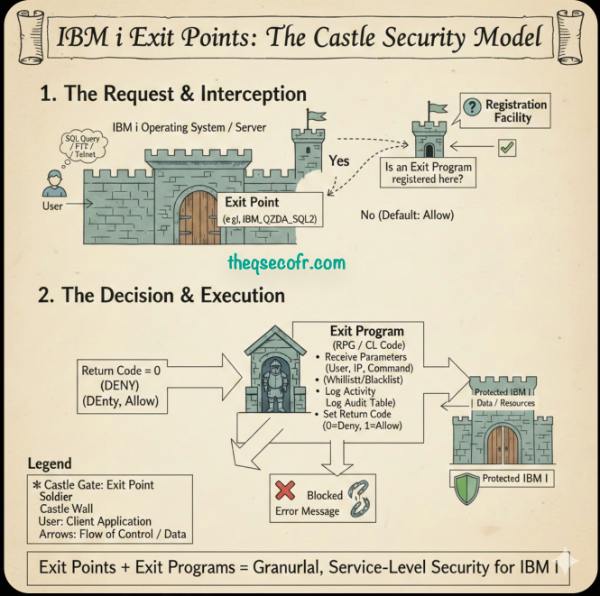
- The Request: A user attempts an action (e.g., logging in via Telnet or running an SQL query via ODBC, or ftp request) to IBM i through a supported interface.
- The Interruption: This reaches a predefined exit point in the code path. Before executing the request, the IBM i OS checks the Exit Point Manager.
- The system checks whether any exit programs are registered or not.
- The Call: If an Exit Program is registered, the OS calls it, passing a specific structure of data (parameters) containing details about the request. Each exit program receives contextual information.
- The Decision: The Exit Program inspects the data and returns a “Return Code” (usually a ‘1’ for Allow or ‘0’ for Deny).
- The Execution: If allowed, the OS proceeds; if denied, the OS terminates the request and sends an error message to the client.
- The exit program can:
- Allow the request
- Modify request attributes
- Reject the request
- The exit program can:
- IBM i proceeds based on the exit program’s response
This mechanism allows real-time enforcement, not just post-event auditing.

How Exit Points and Exit Programs Work Together
The synergy between exit points and programs is what makes them powerful. To implement:
- Identify the Exit Point: Use
WRKREGINFto browse available points. For security, focus on those related to access paths likeQIBM_QTG_DEVINITfor Telnet orQIBM_QZDA_SQL2 for ODBC. - Write the Exit Program: Define it to match the exit point’s parameter format. For example, in CL, declare parameters using DCL statements.
- Compile Securely: Use commands like
CRTCLPGMwith options for no logging(LOG(*NO))and restricted authority(AUT(*EXCLUDE))to prevent tampering. - Register the Program: Employ the Add Exit Program (
ADDEXITPGM) command, specifying the exit point, format, program number, and library. Example:ADDEXITPGM EXITPNT(QIBM_QTMF_SVR_LOGON) FORMAT(TCPL0100) PGMNBR(1) PGM(MYLIB/MYEXITPGM)

- or via IBM Navigator for i


- Activate: Some changes require restarting the associated server (e.g.,
ENDTCPSVR *FTPfollowed bySTRTCPSVR *FTP). - Test and Monitor: Verify functionality and monitor for performance impacts.
A concrete example is the FTP logon exit point (QIBM_QTMF_SVR_LOGON), which illustrates the mechanics. When a user attempts an FTP logon:
- The FTP server passes parameters like user ID, password (in plain text— a security note), IP address, and lengths.
- The exit program (e.g., a CL program) receives these via its parameter list:
- Input: Application ID (binary 4), User ID (char variable), etc.
- Output: Return code (binary 4), overridden user profile (char 10), etc.
- Logic might check if the IP is within a trusted subnet; if not, set return code 0 to reject.
- Return codes dictate actions: 0 (reject), 1-6 (accept with variations like bypassing password check or overriding values).
Here’s a simplified CL code snippet for an FTP logon exit program (based on standard practices):
Please be aware that this code may not be production-ready and contains bugs. Consider this as pseudo-code. By the way, I’m not a programmer.
PGM PARM(&APPID &USR &USRLEN &PWD &PWDLEN &IP &IPLEN &RETCODE &OUTUSR &OUTPWD &OUTLIB)
DCL &APPID *INT LEN(4)
DCL &USR *CHAR LEN(32767)
DCL &USRLEN *INT LEN(4)
DCL &PWD *CHAR LEN(32767)
DCL &PWDLEN *INT LEN(4)
DCL &IP *CHAR LEN(32767)
DCL &IPLEN *INT LEN(4)
DCL &RETCODE *INT LEN(4)
DCL &OUTUSR *CHAR LEN(10)
DCL &OUTPWD *CHAR LEN(10)
DCL &OUTLIB *CHAR LEN(10)

/* Log the attempt */
SNDPGMMSG MSG('FTP Logon Attempt: User' *CAT &USR *CAT ' from IP' *CAT &IP) MSGTYPE(*INFO) TOUSR(QSYSOPR)

/* Check IP subnet (simplified) */
IF (&IP *EQ '192.168.1.') THEN(DO) CHGVAR &RETCODE VALUE(1) / Accept with original credentials / ENDDO ELSE DO CHGVAR &RETCODE VALUE(0) / Reject */
SNDPGMMSG MSG('Unauthorized FTP from' *CAT &IP) MSGTYPE(*ESCAPE) TOUSR(QSYSOPR)
ENDDO

ENDPGM
This program logs attempts, rejects non-local IPs, and alerts operators, demonstrating proactive security.
How Exit Points and Exit Programs Secure IBM i Access
Why Object Authority Isn’t Enough
Many administrators rely solely on Object Authority (the permissions assigned to files and libraries). However, Object Authority is “blind” to the route a user takes.
The Vulnerability: A user might need *CHANGE authority to a file for a green-screen application. However, that same authority allows them to download the entire file to Excel via an ODBC connection or FTP.
Exit Points bridge this gap. They allow you to define rules based on the service being used. You can create a policy that says: “User ‘BOB’ can update the Payroll file via the ‘PAYAPP’ program, but ‘BOB’ is denied access to that same file if he tries to use FTP.”
| Area of Security | Procedure |
|---|---|
| Controlling Access Paths | IBM i object authority controls what a user can access—but not how they access it. * Exit points allow you to control access paths such as: * Blocking FTP while allowing 5250 * Allowing SQL access only from approved applications * Restricting remote commands from external networks This closes a major security gap exploited in many breaches. |
| Enforcing Least Privilege in Real Time | Even if a user has *ALLOBJ, an exit program can:* Block access from unauthorized IP ranges * Prevent execution outside business hours * Restrict access to sensitive libraries This shifts security enforcement from static permissions to dynamic rules. |
| Preventing Data Exfiltration | Exit programs can intercept: * FTP GET and PUT requests * SQL SELECT operations * IFS file opens They can: * Block downloads of sensitive files * Allow uploads but deny downloads * Mask or redirect access attempts This is critical for protecting regulated data. |
| Auditing and Compliance | Exit programs can log: * Who accessed what * From where * Using which interface * At what time This complements system auditing (QAUDJRN) and provides application-aware audit trails. |
| Compensating Controls for Legacy Applications | Many legacy IBM i applications: * Lack modern authentication * Do not enforce strong access rules Exit programs provide externalized security, allowing you to protect legacy workloads without modifying application code. |
Vendor Solutions vs Custom Exit Programs
While exit programs can be written in-house, many organizations use security products that manage exit points centrally, such as:
- Centralized rule management
- Field-level data protection
- Encryption and masking
- Policy-based enforcement
These solutions reduce risk and administrative complexity while leveraging native IBM i exit point architecture.
Best Practices
- Enable exit points on all external interfaces. Beware of SOCKET exit points, though.
- Log before blocking during initial deployment
- Avoid heavy logic inside exit programs
- Test performance impact under load
- Document exit point dependencies
Last Thoughs
IBM i exit points and programs are indispensable for advanced security customization. They empower you to monitor, control, and secure access paths that might otherwise be exploited, ensuring your system remains a fortress. If you’re implementing these, start with high-risk areas like FTP and expand from there— the investment in security pays dividends in peace of mind.
Exit Points are the “Front Door” security of the IBM i. By implementing Exit Programs, you gain:
- Granular Control: Beyond just “Authorized” or “Not Authorized.”
- Visibility: Deep logging of network-level activity that standard journals might miss.
- Proactive Defense: The ability to kill a malicious SQL injection or unauthorized download before it touches your data.
- Exit programs – IBM i (General Concepts)https://www.ibm.com/docs/en/i/7.4?topic=concepts-exit-programs Explains what exit points are, how they work, and their role in system functions. Core reference for definitions and mechanics.
- Exit programs – IBM i (Performance & Usage)https://www.ibm.com/docs/en/i/7.5.0?topic=performance-exit-programs Details exit point formats (e.g., QIBM_QZDA_SQL1/SQL2) and usage in database/host server contexts.
- Exit program parameter formatshttps://www.ibm.com/docs/en/i/7.5.0?topic=programs-exit-program-parameter-formats Describes parameter structures passed to exit programs, essential for writing custom programs.
- FTP server logon exit point (QIBM_QTMF_SVR_LOGON)https://www.ibm.com/docs/en/i/7.4.0?topic=programs-ftp-server-logon-exit-point Specific documentation for the FTP logon exit point, including parameter formats like TCPL0200. Directly supports the FTP example in the post.
- TCPL0200 exit point format (FTP details)https://www.ibm.com/docs/en/i/7.4?topic=point-tcpl0200-exit-format Detailed parameter layout for FTP server logon exit point.
- Register exit programs (WRKREGINF command)https://www.ibm.com/docs/en/i/7.5.0?topic=programs-register-exit How to register, manage, and work with exit points using WRKREGINF.
- Using security exit programs on IBM ihttps://www.ibm.com/docs/fi/i/7.4.0?topic=security-using-exit-programs Focuses on security applications, logon validation, and file request controls via exit programs.
- Controlling IBM i Access With Exit Points (IT Jungle, 2021) https://www.itjungle.com/2021/03/29/controlling-ibm-i-access-with-exit-points Excellent overview of using exit points to secure four key access layers (network, database, etc.).
- Using Exit Point Programming to Control IBM i Access (Seasoft / Software Engineering of America, 2024) https://seasoft.com/blog/ibm-i/using-exit-point-programming-to-control-ibm-i-access Includes diagrams and examples of exit points for Telnet, ODBC, FTP, and more.
- 3 Ways to Manage IBM i Exit Programs (Seasoft, 2025) https://seasoft.com/blog/ibm-i/3-ways-to-manage-ibm-i-exit-programs Covers management of exit points/programs and their role in firewall-like security.
- Exit Points and Exit Programs – Explained and Illustrated (SecureMyi) https://www.securemyi.com/nl/articles/Exit%20Program%20FTP.html Detailed explanation with FTP server logon auditing/control examples.
- IBM i exit points for security (Kisco U) https://www.kisco.com/u/content/ibm-i-exit-points-for-security.html Lists key security-related exit points and their practical use.
- The Complete Guide to Securing IBM i Exit Points (Fortra Powertech / HelpSystems) https://power.fortra.com/resources/guides/securing-ibm-i-exit-points Free downloadable guide on exit points, exit programs, and security impact (highly recommended for deeper reading).
- IBM i Exit Points: What They Are and When to Use Them (MC Press Online, 2016) https://www.mcpressonline.com/security/ibm-i-os400-i5os/ibm-i-exit-points-what-they-are-and-when-to-use-them Good foundational article on customization and control via exit points.


